SafeYT
Nuanced YouTube control for school Chromebooks. Allow learning, block everything else.
Free, open source, and nothing leaves the device.
On the Chromebook
What students see
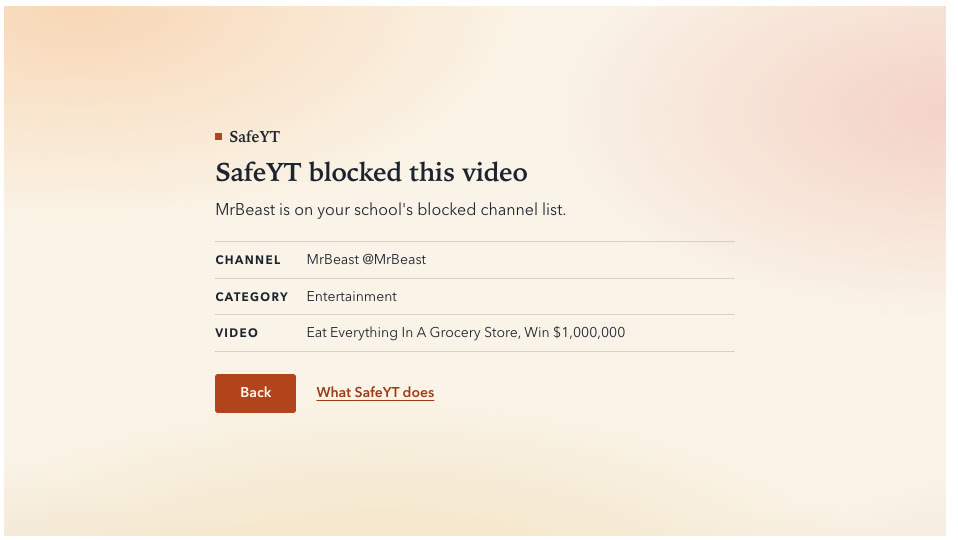
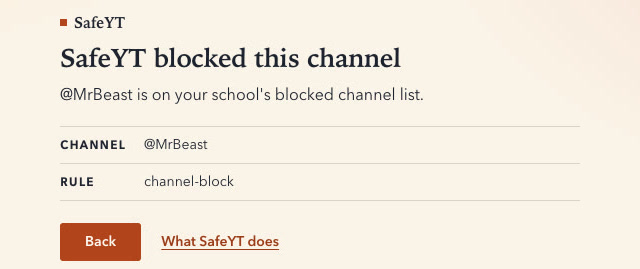
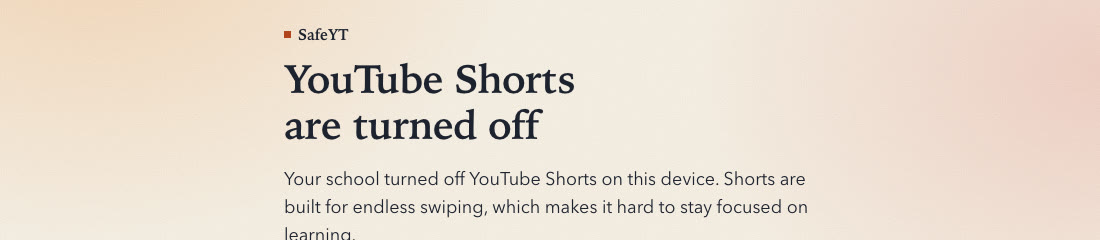
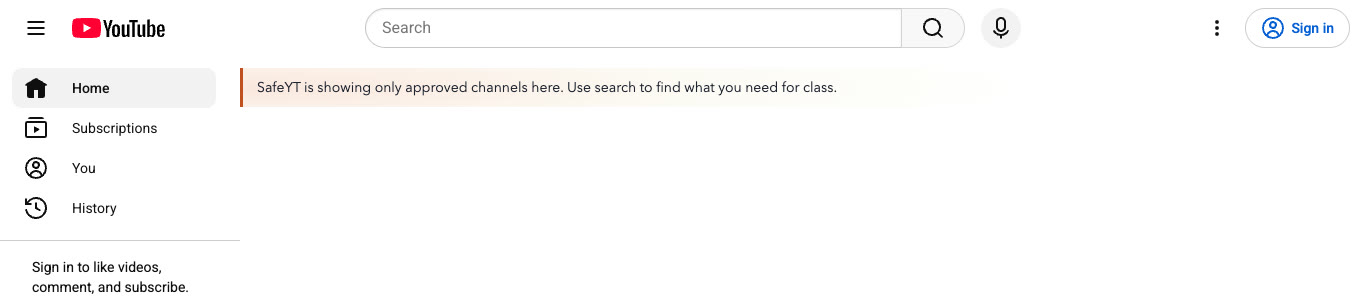
SafeYT does not hide YouTube. Students search, open videos and follow links as usual. When something is blocked, they see a calm card that names the channel, the category and the reason, with a way back. These are unedited screenshots of the extension on live youtube.com.
43 seconds
Watch it work
One decision per video
How it decides
For every video, SafeYT walks one ordered list. The first rule that matches wins. In the default strict mode a video plays only when SafeYT can verify it as learning content.
- Shorts: blockShorts are blocked while
blockShortsis on, even from a channel on the allow list. - Allow list: playA channel the district approved, such as Khan Academy or Amoeba Sisters, always plays.
- Block list: blockA channel the district blocked, such as MrBeast or a gaming streamer, never plays.
- Entertainment titles: blockTitles like "prank", "24 hours", "$10,000" or "challenge" block. A title can block a video but never makes one play.
- Blocked category: blockGaming, Entertainment, Comedy, Music and similar block, unless the student has free-choice minutes left today.
- Learning category the classifier agrees with: playEducation, Science & Technology, Howto & Style and News play only when the on-device model also scores the video as learning content. Entertainment filed under Education does not get through on its category.
- Otherwise: block"SafeYT only plays videos it can verify as learning content. Ask your teacher to add this channel if you need it." The classifier alone never makes a video play.
Two layers: a list and a model
A curated channel database. The default policy ships with 49 learning channels on the allow list (Khan Academy, CrashCourse, Amoeba Sisters, 3Blue1Brown, TED-Ed, Heimler's History and more) and 4,945 entertainment channels on the block list (MrBeast, IShowSpeed, Kai Cenat, gaming, kids entertainment, music artists and more), each one verified live on YouTube. Both lists are plain JSON that a district can edit, extend or replace, including a teacher's own channel by name.
An on-device, text-only classifier checks every learning-category video from a channel the lists do not know: the category and the model must agree before it plays. It reads the title, tags, description, category and length of a video and scores how much it looks like learning content. It is a small logistic regression with no channel names in it, so it judges channels it has never seen. Thumbnail images were tested, both as simple color and layout features and as pretrained image embeddings, and did not improve accuracy enough to justify the extra code, so the model reads text only. Its training data includes gambling, drug, adult-adjacent, alcohol, weapons and violence content as negatives, next to school health-education channels as learning content, so it can tell the two apart.
It was trained on 8,283 labeled videos from 693 channels (about one in eight not in English), and every number above comes from channels the model never saw in training (cross-validated ROC AUC 0.990; on a separate 104-channel test split it caught 100% of entertainment and allowed 72% of learning videos). It is tuned for high recall: the threshold is set so that at least 99% of entertainment is blocked, and the price is paid by learning videos that read like general-audience content (study tips, health and wellness, art and music lessons), about half of which are blocked unless their channel is on the allow list. Scoring takes about 14 µs per video and loading the model about 4 ms once, measured on a laptop; a Chromebook is a few times slower. It runs inside the extension and never sends anything anywhere. The full training report has every split and threshold.
No server
Privacy
SafeYT has no server, no accounts, no analytics and no telemetry. Nothing it records leaves the device. Its only network requests go to YouTube, to check the videos a student opens, and to the district's own policy file, if the district set one.
What it keeps, all in the browser on that Chromebook:
- a block log of the last 50 blocked videos or channels, with the reason;
- today's counts and free-choice minutes, reset at midnight;
- the policy in force and the last good copy of the district's policy file;
- a cache of public video details for 6 hours and channel details for 24 hours, cleared when the browser closes.
It never reads searches, keystrokes, other websites, names, email addresses or locations. On ephemeral Chromebooks everything is deleted at sign-out.
For procurement: the data statement, a pre-filled student data privacy exhibit, the accessibility statement (WCAG 2.2 AA target) and the New York Education Law 2-d package.
One JSON file
What administrators control
Policies come from Google Admin (the extension's managed storage) or from a JSON file the district hosts at an HTTPS address, so one edit reaches every Chromebook: Admin changes arrive within minutes, and the hosted file is re-read every 15 minutes. Admin fields win over the hosted file, which wins over the bundled default.
| Field | What it does |
|---|---|
mode | strict (default) plays only verified learning content; nuanced blocks only clear entertainment; allowlist plays only approved channels and learning categories. |
allowChannels | Channels that always play: handles, channel IDs or exact names. |
blockChannels | Channels that never play, and whose channel pages are blocked. |
allowCategories / blockCategories | YouTube categories treated as learning or as entertainment. |
blockTitlePatterns | Title patterns that block a video ("prank", "24 hours", dollar amounts). Titles never allow. |
blockShorts | Turns Shorts off everywhere, including approved channels' Shorts. |
hideComments | Hides comment sections. |
hideAds | Hides YouTube's promoted videos, ad slots, banners and ad overlays on the page. On by default. It does not skip ads that play inside the video player. |
hideRecommendations | offchannel hides suggestions not from an approved channel or the one being watched; all hides every suggestion; none leaves them. |
homeFeed | allowed-only shows only approved channels on the home page; hide-blocked hides only blocked cards; hide-all replaces the feed with a search note. |
dailyEntertainmentMinutes | Minutes per day of otherwise blocked categories. Blocked channels stay blocked. Default 0. |
schedule | School days, start and end times and time zone. |
schedule.outsideHours | same (default) keeps the rules at every hour; relaxed drops title, category and model blocks outside hours; off turns filtering off. |
policyUrl | An HTTPS address of a district-hosted policy file, fetched every 15 minutes and cached. |
showReasons | Shows the rule and reason on every block screen. On by default. |
model | Turns the classifier on or off and sets its block and allow thresholds. |
enforcement.mediaGate | Blocks YouTube's video servers in every tab until SafeYT has approved the video. On by default. |
enforcement.streamLockdown | On policy installs, stops YouTube from ever sending stream addresses for a blocked or unchecked video. On by default. |
The bundled default policy is a good starting point to copy. The setup guide walks through Google Admin step by step.
For every school
Free and open source
SafeYT is free for everyone under the GNU Affero General Public License v3. US public schools, districts, charter schools and education agencies may use it under MIT terms instead, with no obligation to publish changes, under the additional permission for US public schools.
Questions, pilots or other terms: [email protected].